Dressmaker sketchbook: choose components without getting lost
Use the Dressmaker sketchbook to select components, read names and compare a design with the customer brief before drafting patterns.
Sketchbook: choose components without getting lost
If cycling the arrows leaves you lost, look at the component name itself. The sketchbook is a selection tool as well as a drawing of the design. Choosing one part deliberately is easier than changing several areas at once.
Check the clickable names
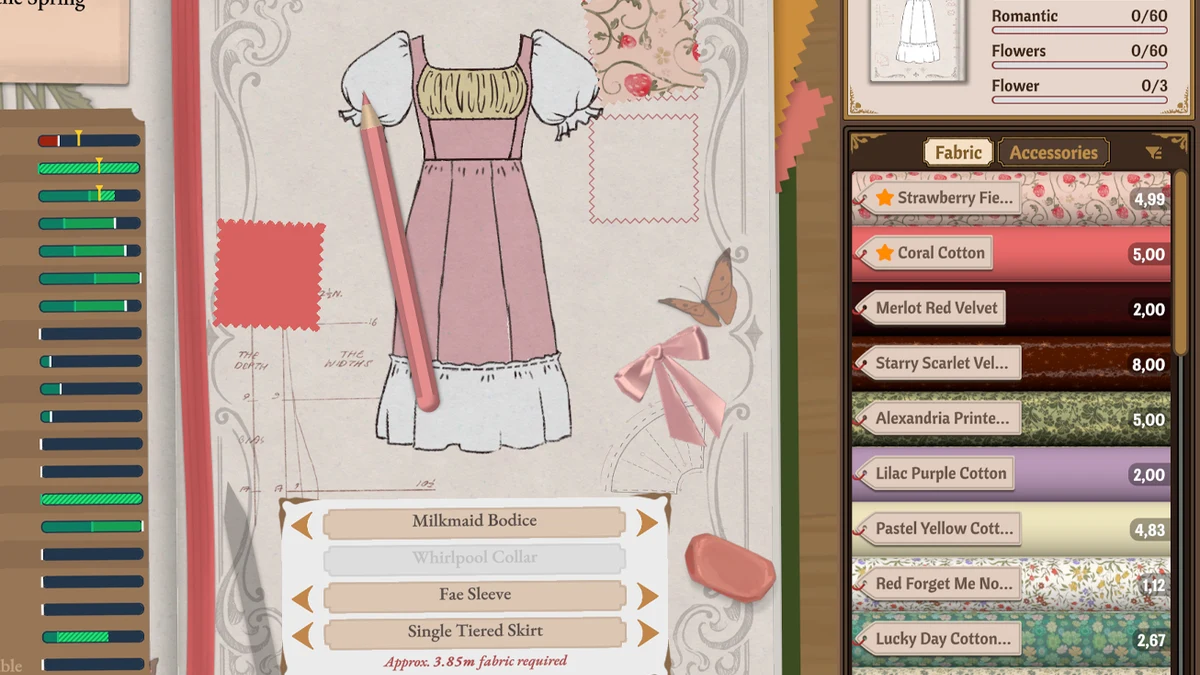
Image: official Cozy Lives / Free Lives media.
Build 410 makes the clickable component names more obvious. If you have used only the arrows, inspect that interaction. After changing a part, compare the silhouette before moving on to another area.
Keep the plan small enough to use
Note the shape, main material and one focal detail, then compare those choices with the brief. The sketch helps you remember the idea; inventory and mannequin views still establish the pieces and their positions.
When money is tight, decide the required structure first. Repeated last-minute redesigns can disrupt the budget more than a restrained finishing pass.
Missing an older design?
Community players mention notebook history pages, the character name above friendship stars and an off-the-rack history entry. Check those leads before assuming a save is lost. They are navigation tips, not proof of a universal undo or cross-edition import.
Where to go next
- Dressmaker commission rejected? Check targets and limits
- Dressmaker components and panels: know what you are assembling
- Dressmaker dress history: find and share your creations
Sources and version
Reviewed on 9 October 2026. Player observations are identified in the guide; check controls against your installed version.
Related Articles
achievements
Dressmaker achievements: all 32 names and visible conditions
Browse all 32 Dressmaker Steam achievements, public conditions and hidden entries. Find related guides without revealing every spoiler.
achievements
Dressmaker completion plan: projects, budget and dialogue spoilers
Plan Dressmaker Steam achievement completion around customer progress, special garments and budget, with dialogue spoilers clearly separated.
characters
Dressmaker customers: preferences, measurements and briefs
Explore ten Dressmaker customers, their style preferences and community measurement references. Compare personal tastes with each active brief.
Was this helpful?
Thanks for the feedback!