Dressmaker sewing controls: speed, thread and assist
Learn Dressmaker sewing controls for speed, thread and assist. Use annotated interface references to check the needle and seam route.
Sewing controls: speed, thread and assist
Start with three things: the needle, the route and the speed control. Once you can see where the fabric is going, assist and reset options are easier to evaluate.
Follow the prompts in your game
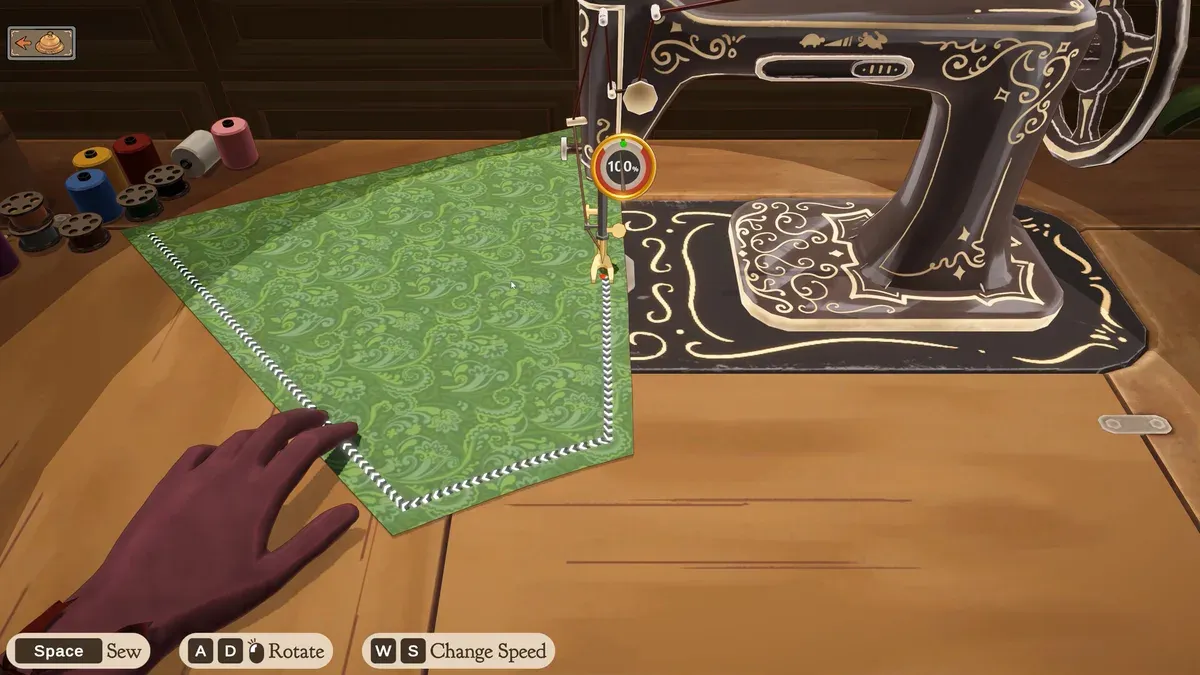
Follow the route on the panel. The bottom prompts show sewing, rotation and speed controls. Official game media.
- 1Spools on the left: Build 410 documents clicking them to change thread colour.
- 2Needle and route: follow the visible path on the current panel.
- 3Bottom prompts identify Sew, Rotate and Change Speed controls.
| Feature | Evidence |
|---|---|
| Thread spools | Official Build 410 patch |
| Sewing Assist | Player completionist guide |
| Current-piece reset with R | Player tutorial guide |
| Prompt | Meaning | Check before use |
|---|---|---|
| Space — Sew | Sew the current seam | Compare your on-screen hint |
| A / D and a mouse symbol — Rotate | Rotate fabric | The symbol alone does not establish the exact mouse input |
| W / S — Change Speed | Adjust speed | Watch the current speed display |
The official image shows Space for sewing, A/D and a mouse symbol for rotation, and W/S for speed. The mouse symbol does not explain the complete input. If your interface differs, use its current prompts rather than forcing this table onto it.
Try a different thread colour for visibility
Build 410 officially documents clicking the spools to change thread colour. A colour that stands out against the fabric can help you read the route. The patch does not say that a particular colour earns a quality bonus.
Check assist and reset before relying on them
A community completionist guide describes Sewing Assist in Options and speed selection. A tutorial guide reports R as a reset for the current sewing piece. Check your build’s hints, and do not treat a current-attempt reset as a whole-dress undo.
Choose a route you can see, slow before a difficult corner and inspect the needle after turning. The aim is a repeatable attempt you can learn from, not the fastest possible run.
Where to go next
- Dressmaker 100% quality: find the stage to improve
- Dressmaker sewing practice: work on one difficult turn
- Dressmaker Build 410: component names, spools and panel hints
Sources and version
Reviewed on 9 October 2026. Player observations are identified in the guide; check controls against your installed version.
Related Articles
achievements
Dressmaker achievements: all 32 names and visible conditions
Browse all 32 Dressmaker Steam achievements, public conditions and hidden entries. Find related guides without revealing every spoiler.
achievements
Dressmaker completion plan: projects, budget and dialogue spoilers
Plan Dressmaker Steam achievement completion around customer progress, special garments and budget, with dialogue spoilers clearly separated.
characters
Dressmaker customers: preferences, measurements and briefs
Explore ten Dressmaker customers, their style preferences and community measurement references. Compare personal tastes with each active brief.
Was this helpful?
Thanks for the feedback!