Check arrows, readings and the fabric beneath
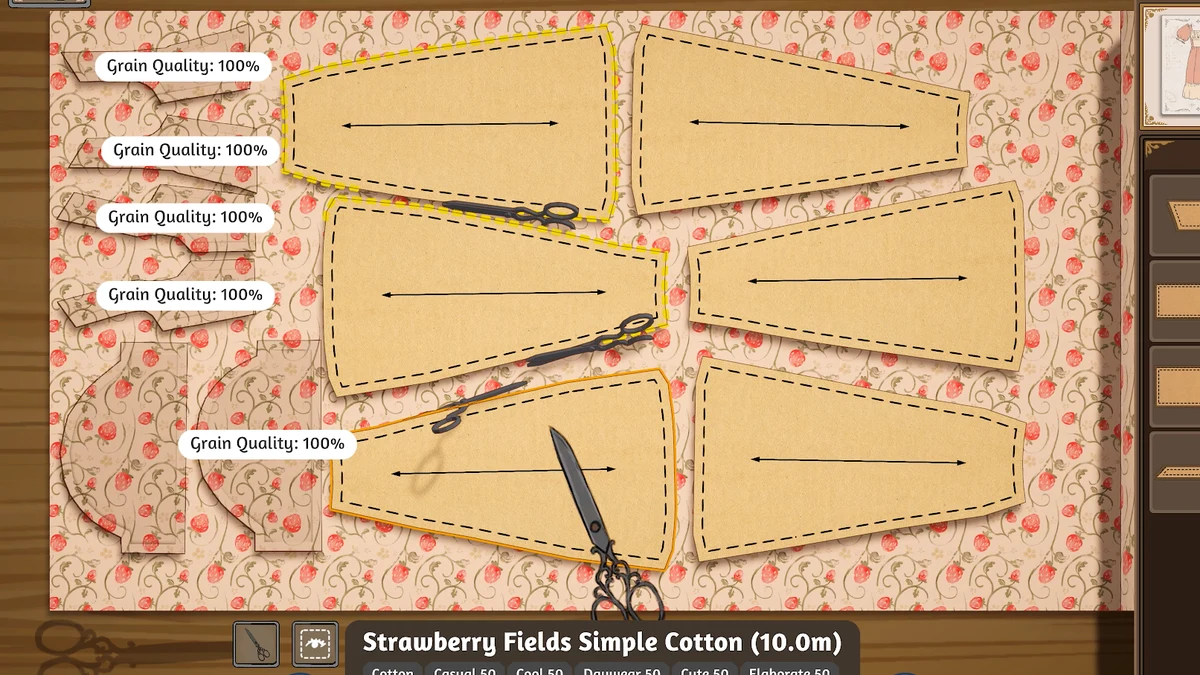
Image: official Cozy Lives / Free Lives media.
Look at the arrows inside the patterns, each panel’s Grain Quality and the printed fabric beneath it. The official description confirms that your arrangement carries through to the garment. Compare paired pieces when you want symmetry, or make sure a contrasting panel is a deliberate choice.
A grain reading is one stage of the project
The displayed Grain Quality belongs to individual panels. Even a full reading on every piece does not establish overall dress quality or promise a continuous print at every seam. Fit and stitching still need their own review.
Make one change you can trace
Note the panel you are moving and keep an image of the cutting layout. Compare it with the mannequin preview, then adjust one piece at a time. Changing the shape, fabric and orientation together makes the next result much harder to explain.
Use the editing controls in your installed build. Older prototype videos can offer design ideas, but their shortcuts may differ.
Where to go next
- Dressmaker beginner guide: finish your first dress
- Dressmaker fabrics: choose for the brief and the design
- Dressmaker Steam or prototype? Choose the right edition
Build 443 changes checked 15 October 2026
Discarding fabric now requires pressing the discard-fabric button first. There is a button to collect all panels, drag panning, and mouse-wheel panning with scissors selected. The update fixes leaving the scene during scissor animation. Follow the hints in your installed build.
Full patch notes: Build 443.
What is the safest way to end a cutting pass?
Build 443 provides a button to grab all panel pieces. Before leaving, compare the intended component list with what has been cut and collected. A collect-all action saves repeated collection; it does not cut an uncut piece or establish that every component belongs to the intended design.
The patch also requires clicking the discard-fabric button before scissors can discard fabric. Treat discarding as a separate decision from rearranging the layout. Check the selected tool and the fabric you intend to remove before confirming the action.
How can you make the layout easier to inspect?
The cutting room supports drag panning and wheel panning while scissors are selected. Move the view so the whole relevant panel and its indicators are readable. If a wheel action differs from the mannequin scene, check the context rather than assuming the camera controls are identical.
Use two records before the cut: the grain reading and the visible print area. After collection, use a third: the panel label. This sequence separates orientation, appearance and construction identity. The print-planning guide shows how to investigate a border or focal motif, while the panel guide traces pieces into inventory.
If the scissors become unresponsive after an animation, note the last action and the installed build. Build 443 fixes leaving during the cutting animation, but a new persistent fault still needs its own reproduction. Do not repeatedly discard material to test an input problem. See troubleshooting for the report record.
Expansion checked 21 October 2026 against Build 443. The order of checks is editorial.
A cut piece or unwanted fabric: what can you recover?
Build 443 changed the scissors workflow: select the discard fabric button before cutting away unwanted cloth. The patch also added a grab all panels action. Check the actual prompt in your installed build. Official patch.
chaseit’s player guide, last updated 11 October, describes taking a piece off the mannequin with the seam ripper, returning it to the pattern tab, then placing it in the basket at the cutting table. The guide reports that fabric is restored only if it has not already been cut away; after that, the discarded fabric is lost. This is a player report, not a test of every version. Check the preview and current prompts before discarding.
Sources and version
Base guide reviewed on 9 October 2026. The Build 443 addendum was checked against the official patch notes on 15 October 2026. This is a source-based guide, not a playtest. Player observations are identified in the guide; check controls against your installed version.