Dressmaker beginner guide: finish your first dress
Start the Dressmaker Steam game with a clear workflow: read the brief, measure, choose fabric, cut panels, sew and check your first commission.
Beginner guide: finish your first dress
The sketchbook gives you a lot of choices at once. You do not need to make your most elaborate gown on your first commission. A better first goal is to carry one customer’s brief through the whole process without losing track of what it asks for.
Read the brief before choosing a dress
Write down quality, style targets, accessory counts and budget. In the illustrated Prudence brief, quality is 80, Eveningwear 40, Romantic 60 and Flowers 60, with at least three Flower accessories. The Flowers style target and the Flower accessory count are separate checks. A floral fabric is not enough to establish both.
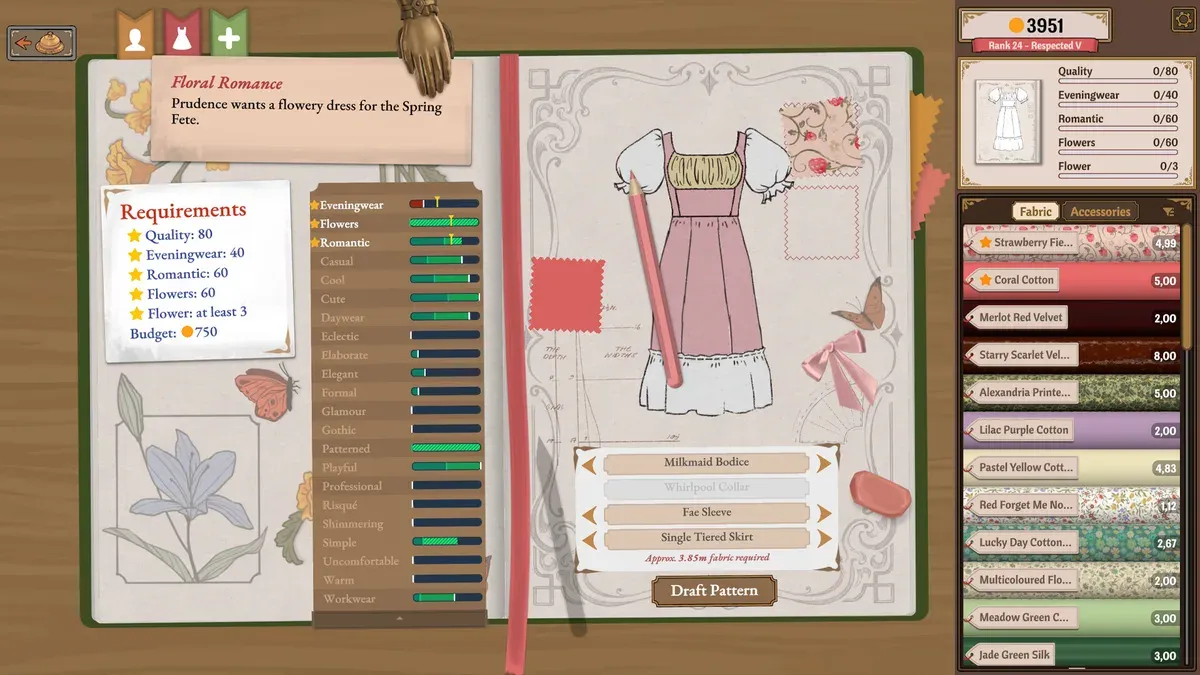
Read the brief on the left, then compare it with progress on the right. This Prudence example may differ from your current commission.
- 1Start with the Requirements card on the left.
- 2The right panel tracks the current garment against targets; the drawing alone is not a completed result.
- 3Draft Pattern sits below the component choices; review the design before drafting.
Work through one manageable project
- Confirm the customer and active project.
- Check measurements and the mannequin before drafting.
- Choose fabric after comparing its price and labels with the brief.
- Arrange the panels, check grain and print placement, then cut.
- Match inventory pieces to the mannequin and sew the remaining seams.
- Add decorations, then review the brief, final quality and appearance separately.
One main colour and one focal detail are enough for a first design. More accessories mean more decisions to keep track of. You can explore an ambitious combination once the workflow feels familiar.
Unsure whether to hand it in?
Return to your checklist. A pleasing appearance does not automatically satisfy quality or counted requirements. If one target is short, investigate that target first instead of abandoning the entire garment. At the completion screen, distinguish continuing the work from handing in the commission, and confirm that you are acting on the intended project.
Where to go next
- Dressmaker commission rejected? Check targets and limits
- Dressmaker measurements: check the customer and mannequin
- Dressmaker sewing controls: speed, thread and assist
Sources and version
Reviewed on 9 October 2026. Player observations are identified in the guide; check controls against your installed version.
Related Articles
guides
Dressmaker cutting: check grain and print placement
Learn how grain direction and print placement affect Dressmaker panels. Check pattern layout and fabric before cutting your next dress.
guides
Dressmaker sewing practice: work on one difficult turn
Practice difficult Dressmaker seams by checking route visibility, turn timing and speed before changing the whole garment.
guides
Dressmaker commission rejected? Check targets and limits
Dressmaker commission rejected? Check quality, style targets, accessory counts and budget separately before remaking a dress.
Was this helpful?
Thanks for the feedback!