What measurements change
The April developer log explains that simplified measurements adjust the mannequin and inform the drafted pieces. Choosing a silhouette and matching a customer’s dimensions are different tasks. For exact dimensions, read the customer record and current project rather than estimating from a mannequin image.
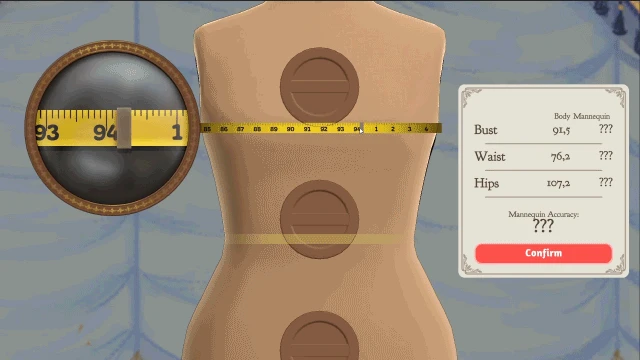
The tape reading appears beside the Body/Mannequin table.
- Compare the customer's measurements with the mannequin settings before cutting.
- The values in this April development image are examples. Use the values in your current project.
Pre-release media published April 15, 2026. This image does not establish the Build 443 interface or item unlocks.
Cozy Lives / Free Lives
Read the original publicationCustomer measurements missing from the sketchbook?
Before measuring again, turn through the sketchbook’s open commissions and check that the customer and project are the ones you intend to draft. In the Steam discussion “Clients measurements missing? Is there a way to redo them?”, the original poster reported seeing Rose’s measurements while looking for Prudence’s; turning back to Prudence’s commission resolved that player’s mix-up. The report does not identify a game build, so this is a useful first check, not a universal fix for missing measurements. Keep the project and record the customer, active page and build if the measurements are still absent.
A measurement will not register?
In the Steam discussion “BUG - cant measure Fiona’s bust”, a player reported holding the tape at the centre of Fiona’s bust and slowly moving it to the right until it registered. Another player in the same discussion still could not register the measurement after trying to reposition the tape. These are individual reports with no stated build, not a verified fix. If the reading remains stuck, note which measurement registered, what the tape did and the game version; use the troubleshooting checklist rather than deleting a project.
These two community cases were checked on 9 November 2026; this site has not independently reproduced them. The developer’s April log describes measuring the customer, adjusting the mannequin and drafting pieces from those measurements as separate stages.
Make a short pre-cutting check
| Stage | Editorial checkpoint |
|---|---|
| Customer | Confirm whose dress this is |
| Measuring | Read the displayed guides |
| Mannequin | Recheck the selected dimensions |
| Pattern | Confirm the intended project is drafted |
Keep the customer name, measurement display and mannequin settings together. If two attempts differ, compare these records before changing material. One deliberate adjustment is easier to learn from than a complete redesign.
How to use a community size table
Use it as a second reference to catch a reading or transcription mistake. Matching a reported number is not a reason to skip the checks in your own game. A community completionist guide warns about display rounding; that is player experience, not a published universal fit tolerance.
For the 100% achievement, check the finished garment’s overall quality as well. Fit is one part of the diagnosis.
Where to go next
- Dressmaker customers: preferences, measurements and briefs
- Dressmaker 100% quality: find the stage to improve
- Dressmaker commission rejected? Check targets and limits
Sizing controls in Build 443
Build 443 adds wheel and arrow-key adjustment for mannequin gears in the sizing room. It also fixes a measuring-scene animation problem at low frame rates. A visual animation fault and a wrong mannequin setting are separate observations; record which one you can see before repeating the measurements.
How do you trace a fit mismatch?
| Question | Compare | Keep for the next attempt |
|---|---|---|
| Whose measurements are these? | Customer name and open brief | Project identity |
| What was entered? | Current measurement display and mannequin | Displayed values, without rounding by guess |
| Which pieces were drafted? | Component selection and generated panels | Panel labels |
| What changed after that? | Fit setup before cutting versus current garment | The first stage where the record differs |
If the customer matches but the panel labels do not, follow the component and inventory guide. If labels and dimensions match but a seam remains unfinished, move to sewing checks rather than adjusting body dimensions to conceal the symptom.
For an editorial practice attempt, keep the same client and component layout, then revisit the uncertain measurement only. Record the display before proceeding. You can then distinguish a setup correction from the effect of a different silhouette. The quality guide provides the rest of the stage record.
Expansion checked 21 October 2026 against the April development record and Build 443.
A concrete measurement comparison
For Rose, ham reports 86.3 / 68.7 / 95.8, while dreamcatcheross reports 86.2 / 68.7 / 95.8. These are two credited player readings, not a universal input or a reason to overwrite your own measurements. Open Rose’s profile for both sources; compare customer, units and the visible gauge before adjusting the mannequin.
The Build 443 announcement says the measurement gears can be adjusted with the mouse wheel or arrow keys. Follow the current on-screen controls and record the result; a rounded display alone does not establish an exact internal value.
Sources and version
Reviewed on 9 October 2026. Player observations are identified in the guide; check controls against your installed version.