Give each attempt one small goal
| Attempt | Focus | What to notice |
|---|---|---|
| First | Read the path | Where do you lose track? |
| Second | Make deliberate turns | Are you rushing the change of direction? |
| Third | Keep a steady rhythm | Does your concentration drop midway? |
Choose a project with a visible route. First identify the difficult section, then watch your turn, then compare your rhythm. Change speed or steering deliberately rather than both at once.
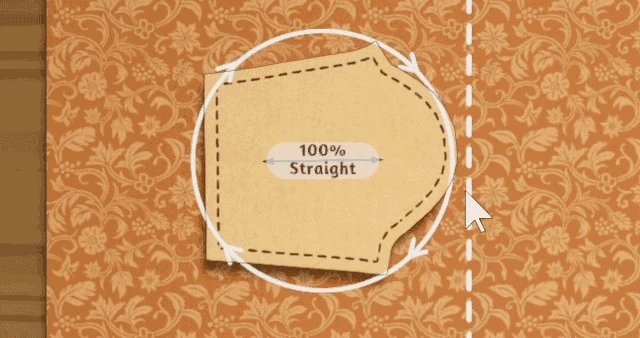
A circular piece at the sewing stage shows a local 100% Straight result.
- Attach this result to the visible sewing action rather than calling it final dress quality.
- Read the active route and controls in your own build when practising a difficult turn.
Pre-release media published April 15, 2026. This image does not establish the Build 443 interface or item unlocks.
Cozy Lives / Free Lives
Read the original publicationSlowing down gives you time to see
Read the current speed and rotation prompts. Give yourself more time before a difficult corner, then inspect the needle position afterward. The garment can look generally correct while the immediate route still needs attention; focus on the small section in front of you.
The separate controls guide covers the visible keys, spools and community assist options. This practice sequence is a learning suggestion, not a published scoring formula.
When practice becomes troubleshooting
Unresponsive input or a project that cannot continue after panels and seams have been checked needs a different approach. Keep a screenshot, build number and last action, then follow the panel or bug-report checklist.
Where to go next
- Dressmaker Steam or prototype? Choose the right edition
- Dressmaker troubleshooting: protect the project and report clearly
- Dressmaker beginner guide: finish your first dress
What does a local seam result tell you?
The historical official sewing figure shows a circular piece and a visible 100% Straight result. It illustrates a local sewing-stage outcome. Keep that result attached to the piece and stitch you were working on, then inspect the rest of the garment separately. A successful section gives you a useful practice reference, not permission to skip other seams.
Build 410 lets you change thread colour by clicking the spools. Choose the colour deliberately before comparing the appearance of a seam. A contrasting thread can make a route easier to inspect visually, while a close colour can make the finished line quieter. Those are visual design choices; the patch does not describe a quality bonus for one colour.
What should a practice record contain?
| Record | Example of a useful description |
|---|---|
| Starting point | The named piece and the visible section of the route |
| Difficulty | A tight turn, losing the path, or a response problem |
| Single change | A slower approach or a deliberate rotation adjustment |
| Result | What happened at the same section afterward |
Use the same route for a comparison when possible. Replacing the whole silhouette can introduce different curves before you have learned what happened on the original one. For input problems, the controls guide and troubleshooting are more useful than another unrecorded attempt.
Build 443’s Less Animation option disables specified sewing zoom effects and scrolling textures. If movement distracts you from reading the route, compare that option independently. See camera and accessibility for its exact scope.
Expansion checked 21 October 2026 against the official April demonstration, Build 410 and Build 443. The practice record is editorial guidance.
Sources and version
Reviewed on 9 October 2026. Player observations are identified in the guide; check controls against your installed version.