Dressmaker dress history: find and share your creations
Find Dressmaker creations in dress history, distinguish notebook previews from shareable images and check the relevant controls.
Dress history: find and share your creations
A dress you spent time on is worth looking at again. First decide whether you want the in-game record or a full image you can share. Finding a notebook preview does not necessarily locate an exported picture.
Look through the notebook first
Players in the linked Steam discussion suggest turning back through notebook pages and checking the character name above friendship stars. An off-the-rack history entry is mentioned too. These are community navigation leads to try before assuming the creation has disappeared.
What the photo buttons tell us
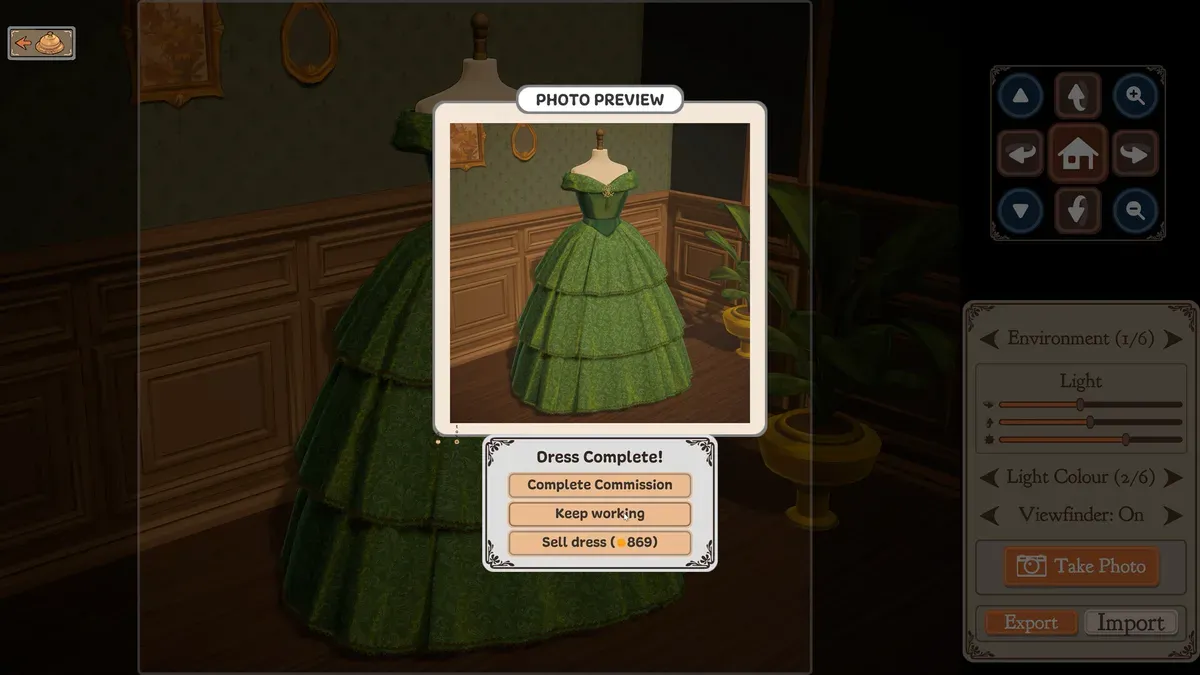
Choose between handing in, continuing the work and selling. Confirm the project first; 869 is the example sale value shown here.
- 1Complete Commission: the hand-in option.
- 2Keep working: continue the current garment.
- 3Sell dress: a sale option; 869 is the screenshot’s example value.
The official image shows Take Photo, Export, Import and a photo preview. The labels do not establish a file format or export directory, and Import should not be assumed to restore a save. The discussion began with a player finding thumbnails but not full-size images, so keep those artifacts separate.
Keep a full view and a favourite detail
A full-length image shows the silhouette and palette; a close-up shows the neckline, waist or trim you care about. If the export location is unclear, a normal device screenshot is a useful way to keep the picture without sharing your save.
A short caption can explain the idea, your favourite choice and what you want to try next. A creation does not have to be perfect to be worth keeping.
Where to go next
- Dressmaker sketchbook: choose components without getting lost
- Dressmaker decorations: give the dress one focal point
- Dressmaker troubleshooting: protect the project and report clearly
Sources and version
Reviewed on 9 October 2026. Player observations are identified in the guide; check controls against your installed version.
Related Articles
achievements
Dressmaker achievements: all 32 names and visible conditions
Browse all 32 Dressmaker Steam achievements, public conditions and hidden entries. Find related guides without revealing every spoiler.
achievements
Dressmaker completion plan: projects, budget and dialogue spoilers
Plan Dressmaker Steam achievement completion around customer progress, special garments and budget, with dialogue spoilers clearly separated.
characters
Dressmaker customers: preferences, measurements and briefs
Explore ten Dressmaker customers, their style preferences and community measurement references. Compare personal tastes with each active brief.
Was this helpful?
Thanks for the feedback!