Can’t finish the dress or find the commission?
- In the sketchbook, look through open projects and confirm the customer and commission name. A Steam player discussion reports that the open page selects the active project; this is a community observation, not a universal fix.
- Trace the planned pieces through cutting, collection, inventory and placement, then inspect seams from other views. Follow the missing-panel checks before starting over.
- If the dress can be finished but delivery is rejected, compare each requirement row separately. Quality, style, material and accessory counts do not stand in for one another.
- Still blocked? Record the game build, customer, brief and last action. The reports above do not establish that every case has the same cause. Do not delete a project or choose an off-the-rack sale as the first diagnostic step.
These checks refer to the Steam release. Community posts were consulted on 9 November 2026; their exact builds were not established, so compare the controls with your installed version.
Find the brief you are checking
Look up the customer’s name and commission in the recorded commission directory. For a recorded brief, open its details and choose Check these requirements to carry its recorded conditions into the checklist. Enter the values shown in your game and confirm the remaining conditions yourself; the checklist cannot guarantee delivery.
- Librarian Workwear — compare Rose’s quality and Professional targets.
- Vegetable Empire — investigate the recorded colour and style conditions.
- Studious Motivation — check the recorded Lace Trim length and other targets.
If your commission is not in the directory, use the requirements checklist to record its conditions yourself. The directory is partial, and the current in-game brief remains the final reference.
Make a requirement ledger before cutting
Keep the condition and its direction together. A minimum must be reached; a maximum must not be exceeded. A preview of the dress does not replace the displayed requirement progress.
- Quality
Record the displayed quality target.
Check Use the overall garment result, not a panel grain reading.
- Style
Keep each tag and its target on a separate line.
Check Read whether the condition is a minimum or a maximum.
- Fabric
Copy the material type and percentage when the brief specifies one.
Check Read the item label; colour alone does not establish its category.
- Accessories
Record the required category and quantity.
Check Compare the counted-items display, not decoration density.
- Money
Keep the displayed reward, available funds and planned purchases distinct.
Check Leave funds for required finishing items before buying extras.
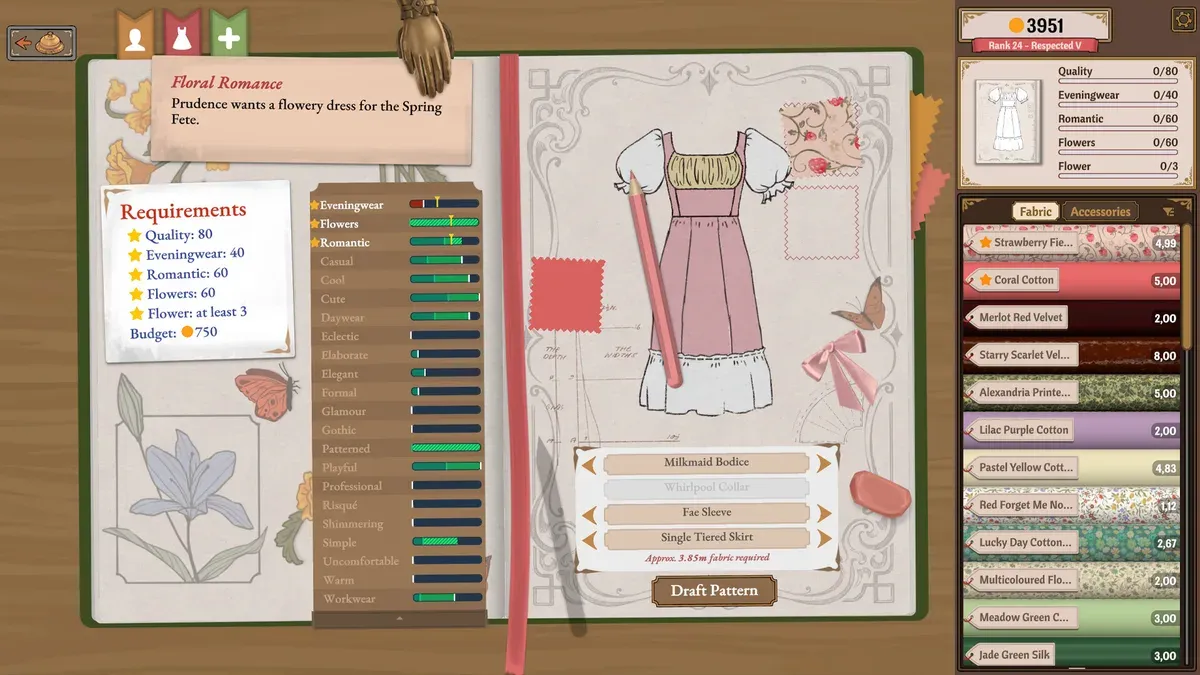
Official Steam product media: Prudence’s illustrated brief. Promotional capture; installed build unspecified. Use the targets in your own commission.
- 1The left Requirements card lists the targets and the displayed amount for this example.
- 2The right list gives Flowers style and Flower accessory count separate progress rows.
- 3Review the requirements before choosing Draft Pattern below the component names.
Game image: Cozy Lives / Free Lives.
Open full-size official screenshotOfficial Steam mediaA real brief: Flowers and Flower
In the Prudence example, Flowers is a style target of 60, while Flower requires at least three accessories. The right-hand list shows separate starting displays, Flowers 0/60 and Flower 0/3, in this capture. They are not the same progress bar.
Record the style target and accessory count on separate lines. A floral fabric can change the appearance, but does not establish that three Flower accessories have been counted. Adding three flowers does not by itself establish the style score either. Compare both displays before buying more.
These numbers belong to the illustrated brief. Your current customer can ask for different targets. The full image above lets you check the labels without treating the example as a guaranteed design recipe.
Match the symptom to the next check
| Symptom | Evidence to keep | Next check |
|---|---|---|
| Style progress is short | Exact tag, target and current progress | Re-read the selected material and component labels; do not substitute accessory count for style |
| An accessory seems not to count | Brief wording, selected item category and counted-items display | Compare the category before purchasing another item; lace fabric and trim can look similar |
| Quality is high but another condition is unmet | Overall quality alongside the separate requirements | Check the unmet style, material or count condition before repeating every seam |
| A section looks unfinished | Selected component, inventory panel and mannequin views | Follow the missing-panel checks before remaking the design |
Change the part that has evidence of a mismatch. Keeping the rest of the garment steady makes the next comparison easier to interpret.
Accepted, but the payment looks wrong
Build 403 records a fix for missing payments on accepted commissions. An accepted dress with an unexpected payment is different from an unmet requirement. Keep the installed build, acceptance result and balance change, then compare the official record; the old fix does not prove every later payment problem is resolved.
Related stage guides
- Read sketchbook component names
- Check the customer and mannequin
- Compare lace fabric and trim
- Work through the whole first commission
How do you investigate one failed condition without losing the design?
Copy the exact wording of the failed condition beside its current display. Then give the next attempt one question. For a material condition, that question might be “which selected component uses the wrong material?” For a counted accessory, it might be “does this item belong to the category named by the brief?” Avoid replacing the entire outfit before either question has an answer.
| Record before the change | One controlled change | Read afterward |
|---|---|---|
| Exact tag, target and progress | One relevant material or component | The same tag plus any capped conditions |
| Required accessory category and count | One candidate with a readable label | Counted progress, not visual density |
| Required colour or fabric type | One named component assignment | The corresponding condition row |
Build 443 gives small components more influence for colour and fabric type. This makes a collar or sleeve worth inspecting even when a large skirt dominates the image. Use the component requirement guide rather than estimating every condition by visible area.
The sketchbook can page through other open commissions, according to the same patch’s tutorial notes. When switching, re-read the customer name and targets. Do not carry a previous project’s reward or accessory count into the new page. The sketchbook workflow explains the selection check.
Finally, distinguish the result message from the financial outcome. Build 443 relabels a photo-scene action “Sell as off-rack.” A sale to the rack and a customer commission are different project outcomes. Read the sale guide before choosing one to recover funds.
These additions were checked on 21 October 2026 against Build 443. The comparison table is editorial guidance.
Case: a warning before Rose’s first hand-in
In Curtis Pyke’s Librarian Workwear recording, the card asks for quality 60 and Professional 40, with a 200-gold reward. On Build 447.804bb8a the player’s garment reached quality 58; the game warned before confirmation. The player chose to deliver, the customer was dissatisfied and the balance rose by 200. A reward is not the same as a project budget, and this single result does not guarantee a payment for every unmet brief.
If the bell rings but no customer appears, first turn through the sketchbook’s in-progress pages. One player discussion reports an unfinished commission was blocking progress. This is a reported case, not a universal fix; avoid deleting a project as a first diagnostic step.
Sources and revision
Source records were originally reviewed on 9 October 2026. The ledger, diagnostic table and screenshot reading were revised on 16 October 2026. The numerical example is transcribed from the displayed official image, not a playtested recipe. Player advice is labelled separately from official patch notes.